Hi, I'm Nike.
Using real-time video generation, I built an AITuber that talks and moves in response to YouTube comments.
The system comes up with a reply and an action based on a comment, then sends them to a video generation API along with synthesized speech, allowing AI Nike-chan to respond on screen.
It starts with an image of the character and generates the video that follows.
For example, a comment like “Wave your hand” can inform both what she says and how she moves in the video.
Here's an actual livestream.
First, I'll explain how H3 Max Director, the tool generating the video, works. Then I'll walk through how I put everything together as an AITuber.
H3 Max Director Accepts New Instructions While Generating Video
I'm using H3 Max Director, available on fal.

 fal.ai
Its key feature is that you can receive video over a persistent connection while sending new scene and action instructions along the way.
You set up the scene at the start, then use instructions like “Walk” or “Wave your hand” to change what it generates next.
Video and audio arrive via WebRTC, a technology for exchanging audio and video in real time in the browser.
Scene and action instructions travel over a data channel on the same connection.
fal Generates the Next Part of the Video
At the start, you provide a URL for the initial image and a prompt describing the scene and actions.
According to the official explanation, each new segment is generated using video from the preceding segment and the context of earlier prompts.
Handling the overlap between segments allows them to be delivered as a continuous stream.
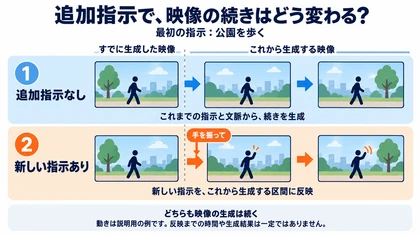
Video generation continues for as long as the session is running, even if you don't send any additional instructions.
The instructions already provided, along with the context of the preceding video and prompts, guide what happens next.
Exactly how the character keeps moving depends on the generated output. There's no guarantee that the same action or appearance will be maintained indefinitely.
Billing is based on the duration of the generated video, so it still costs money while you're watching without sending instructions.
When you add a new instruction, it applies to a subsequent segment.
So “real-time” doesn't mean the action on screen changes the instant you send a command.
Updates during a session can include an audio file URL as well as action instructions.
When you supply externally synthesized speech as the audio to be played, the video is generated conditioned on that audio.
For details, see the Director introduction page above and the official API documentation.
Using This API to Run an AITuber That Responds to Comments
What I built is an app that runs locally in a browser.
Director handles video generation, while comment intake, response decisions, and speech synthesis are connected as separate processes.
| Role | Tool |
|---|---|
| Fetching YouTube comments | OneComme + integration plugin |
| Selecting comments and creating replies and actions | OpenAI |
| Synthesizing speech from replies | Aivis Cloud |
| Generating video from audio and action instructions | H3 Max Director on fal |
| Playback, comment display, and recording | Local browser app |
Receiving Comments and Planning Replies and Actions Together
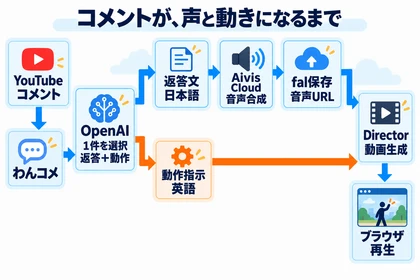
OneComme connects to YouTube and fetches comments, then passes them to the app through a dedicated integration plugin.
Instead of reading every comment in order, the app gives the AI a few recent comments as candidates and generates a reply to one selected comment.
I was using gpt-5.6-luna as the response model.
That choice prioritized response speed and stability over the accuracy of the replies.
A single request returns both a reply in Japanese and action instructions in English, in a predefined JSON format.
For an input like “Smile and wave,” for example, the same request produces a short greeting and instructions for smiling and waving.
Sending Synthesized Speech and Action Instructions to Director
Once the reply is ready, the app synthesizes speech with Aivis Cloud, receives the entire MP3, and uploads it to fal's storage.
It then sends Director the audio URL and action instructions.
The OpenAI LLM decides what to say, Aivis Cloud provides the speaking voice, and fal's Director determines the resulting video.
AI Nike-chan's appearance isn't left entirely to the starting image and initial scene instructions.
The video prompt for each response also includes appearance instructions, so the character can perform the new action while retaining her look.
The incoming WebRTC video and audio play directly in the browser.
Passing Conversation and Scene State to the Next Response
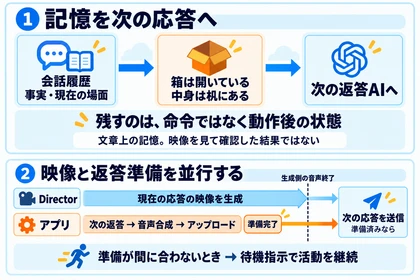
When responding to the next comment, the app gives the response AI the previous conversation along with a short memory summarizing conversational facts and the current scene.
This includes things like “who gave her what” and “where she is and what she's doing now.”
The app maintains these summaries separately from the conversation log.
Scene memory stores the state after an action, rather than the past action command itself.
For example, instead of keeping the instruction “Open the box,” it passes on the state “The box is open, and its contents are on the desk.”
The video instructions also include the states before and after an action, so the next segment can build on what came before.
However, the app only maintains a textual description of the state. It doesn't inspect the video to determine whether an action succeeded.
That means the intended state and the actual video can diverge.
Preparing the Next Reply While the Video Continues
After sending the current response to Director, the app starts preparing the next reply, synthesizing its speech, and uploading it if a new candidate comment is available.
Once Director sends a notification that the current response's audio has ended, the app sends the prepared response.
This is a notification from the generation side, not confirmation that playback in the browser has finished.
If the next reply isn't ready yet, the app sends an idle instruction suited to the current location and activity.
The idea is to keep the character active in the video while the app prepares a reply to a comment.
By combining Director's continuous video generation with comment selection, reply generation, speech synthesis, and state management, this setup creates an AITuber that responds to viewer comments.
Issues That Emerged During Actual Livestreams
After four streams with this setup, I found it fun to see the video change in response to comments. At the same time, the video sometimes failed to keep up with major scene changes and contradicted what the character was saying.
Even with appearance instructions in the prompt, I couldn't fully prevent changes to her facial features after she left the frame, or shifts in art style during longer generation sessions.
In my streams, I also had the impression that the image became darker and murkier over time, so I would start a new session when it began to bother me.
These are observations from this particular setup; I haven't isolated how much came from the model versus the prompts.
I've written about specific moments from the streams, the response on YouTube, and where I might take this next in my retrospective on four livestreams.
Related Links
I also share my work on AI tools and AI character development on X.
 x.com
x.com