
Hey, it's Nike.
Have you ever wanted to make an AI play a video game and provide live commentary while doing it?
I've been building stuff like this for a while. Back in November 2024, I even showed it off at a generative AI showcase exhibition — you can find the details in this note post:

 note.com
This article is written for indie developers who want to try building an AI commentary system, or for people thinking about AITuber-style streaming setups.
The original system had two separate components working together: a play component that watched the game screen and decided what inputs to make, and a commentary component that used the play data to generate real-time dialogue matching the current situation.
It barely held together for the exhibition, but looking back now, the whole thing was kind of a mess.
A year and a half later, a lot has changed — so today I want to walk through three approaches I'd use if I were building this now.
The Old Setup, and What Was Wrong With It
Let me quickly recap how the old commentary system worked.
The play system ran separately and logged game actions. The commentary system used those logs to generate lines. The commentary pipeline went like this:
- Take a screenshot of the game screen and pass it to a multimodal AI (GPT-4o)
- Have the AI analyze the situation and generate commentary dialogue
- Use Style-Bert-VITS2 for speech synthesis
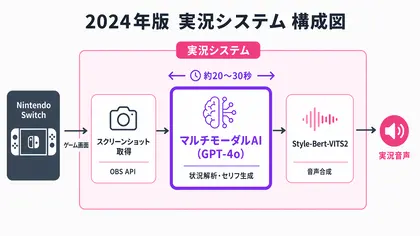
Here's what it actually looked like in action:
It technically worked, but in hindsight the architecture was pretty rough.
The biggest problem with commentary was latency. It took roughly 20–30 seconds from seeing the screen to actually speaking. Almost all of that was the multimodal AI processing time.
It's supposed to be live commentary — but it was taking tens of seconds to respond to what was on screen, and the game had definitely moved on by then.
Cost was also a problem. The multimodal API was running over $10/hour. Stream for a few hours and you're looking at a serious API bill.
So that's the backstory. Now let's talk about how I'd solve this in 2026.
Two of the three approaches I'll cover here — Approaches 1 and 2 — add AI commentary on top of a human player's footage. Approach 3 goes further, with the AI handling both playing and commentary on its own.
Approach 1: Delay the Game Footage and Audio
The first approach is a bit of a lateral-thinking move.
Instead of making the AI faster, delay the video and audio by however long the AI takes to respond.
If it takes a few seconds for the AI to analyze the screen and generate a response, just delay the stream's video and audio by that same amount. From the viewer's perspective, the AI commentary and the game footage line up perfectly.
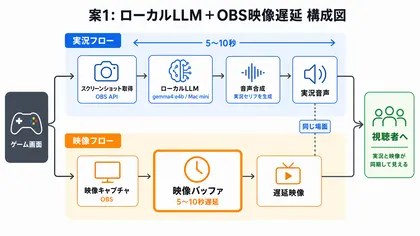
The exact delay depends on the model, but when I tried gemma4:e4b on a Mac mini, it was around 5–10 seconds. That kind of speed from a local model is a recent development — not too long ago you'd have had to rely on a cloud API to get anywhere close.
For the delay itself, you don't need to build a custom video buffer. OBS has a built-in delay feature that handles it.
Since response time isn't perfectly consistent, in that video I set a fixed 8-second delay. The trick is to set the delay slightly shorter than the average response time. If the AI starts speaking just before the relevant moment arrives on screen, viewers won't notice — the action will catch up while the AI is still talking.
The big advantage here is that you barely need to change your existing setup — just add the delay. If you run a local LLM, there are no API costs, which is great for long-running personal projects.
The downside is losing real-time sync. This doesn't work well when you need to stay in sync with another person's stream in real time, like in a collab.
Approach 2: Just Use the Latest Fast Multimodal Model
The second approach is the straightforward one.
Use the fastest modern multimodal model available.
Over the past six months or so, multimodal models from various companies have gotten dramatically faster. The one that impressed me most recently is gemini-3.1-flash-lite-preview — with images included, responses can come back in as little than 2 seconds.
Processing that used to take 20 seconds now finishes in single digits. Technology is wild.
And it's not just faster — the output quality is clearly better than the expensive multimodal models of the old days. What used to be a "slow and fragile" problem gets largely solved just by swapping the model.
The strength of this approach is that you can drop the new model into your existing pipeline without rewriting anything. The screenshot → multimodal → dialogue → speech pipeline stays exactly the same.
The weakness is that there's currently only one model this fast. It's a cloud dependency, so if prices go up or the model gets deprecated, your plan could fall apart quickly.
Bonus: Pre-Reading the Situation in the Background
Here's a step further you can take on top of Approach 2.
In everything described so far, the image passed to the model at generation time was just one frame. The problem with a single frame is that you might capture the middle of a transition, or a moment where the screen doesn't tell the full story — which leads to commentary that misses the context.
The fix: use the dead time while audio is playing.
There are a few seconds between when speech synthesis finishes and when playback ends where the system is just sitting idle. Put that time to work.
Here's how it works:
- While speaking (between synthesis and playback), capture the game screen every few seconds in the background and send it to the LLM
- The LLM converts each image into a short text description of the current situation
- When generating the next line, include these "situation summaries" in the prompt
This way, by the time you're generating the next dialogue, you have a text description of what's been happening on screen — giving the model much better context than a single screenshot would. This only works because fast multimodal models exist; you need to be able to run several rounds of capture → text conversion in just a few seconds.
Approach 3: Pick a Game That Gives You State as Text
Everything so far has been about adding AI commentary to human gameplay. This third approach is different: the AI handles playing the game itself.
In the original system, a multimodal AI analyzed the screen to decide inputs, and an Arduino emulated controller presses. It looked like this:
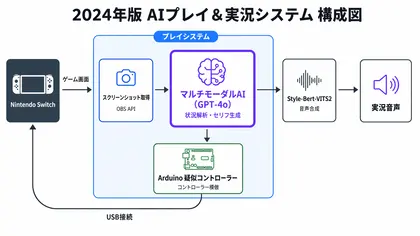
That system had a pile of problems.
Multimodal processing took 30+ seconds per turn, each game required manually building a database of screen states and inputs, and a single recognition failure could leave the system completely stuck. Keeping it stable was genuinely hard.
All of these problems trace back to the same root cause: relying on a multimodal AI to interpret a screen.
If you choose a game where you can get the board state as text — like chess or Othello — that entire pipeline becomes unnecessary. Same goes for commentary: no screen analysis needed, just feed the text log directly to the model.
My first experiment was building the game from scratch. With vibe coding lowering the barrier to making games, designing one with text-first state representation is more realistic than it used to be.
When you build the game yourself, you design all information exchange as text from the ground up. The LLM's output is parsed directly for both moves and commentary, so screen-recognition latency and misreads don't enter the system.
But you can also use existing games that expose their state as text. The best example: Pokémon Showdown.
Pokémon Showdown is a browser-based Pokémon battle simulator. Unlike emulators that run actual game ROMs, it's a ground-up reimplementation of the battle system, and its key feature is that all in-game information is communicated via a text protocol.
Your team, your opponent's field state, the turn sequence, the moves chosen — everything is available as text.
You can see in that video how the center log has the entire battle state in plain text.
Since you don't need to show the AI any screenshots, you just feed the text directly to the LLM and ask it to choose a move — and you have a working AI player. Use those same logs for commentary, and playing and commentary are solved by the same system.
This is also an active research area — LLMs playing Pokémon battles have become a common benchmark, and papers like PokéLLMon and PokéChamp have come out of it.

 arxiv.orgarxiv.org
The strengths of this approach:
- No multimodal needed → extremely fast
- Fewer tokens in the prompt → extremely cheap
- Screen-recognition errors are not part of the pipeline
- No need to build game-specific screen databases
- Play and commentary handled by one unified system
The weakness: only a limited set of games can really take advantage of this approach.
Of course, even if a game doesn't expose text logs, there are still ways to retrieve state or send controls: OCR, image recognition, memory reading, mods, API integration, and so on.
But once you go down that route, the implementation difficulty and stability vary a lot from game to game.
For Approach 3 as described here, if you want to avoid multimodal processing and aim for speed, low cost, and stable behavior, the practical choice is to pick a game whose state is available as text or structured data and whose controls are easy to express as commands.
It's still not especially suited for "make it play any arbitrary game as-is."
If you're curious about which games support which state-capture and control methods, I wrote a follow-up post that digs into exactly that:
Wrapping Up
So that's how the approach to making an AI play games has changed from then to now.
Here's a summary of all three:
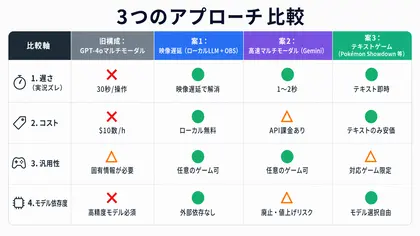
The great thing about 2026 is that you can pick the right tool for the job.
In terms of implementation effort: Approach 2 is the easiest to try first; Approach 1 is good for long-running setups that keep costs down; Approach 3 requires the most work upfront — choosing the right game, designing the system — but the payoff is the highest.
- I want to prototype something as fast as possible → Approach 2
- I want to run it for long periods without spending much → Approach 1
- I want AI commentary over human gameplay → Approach 1 or 2
- I want the AI to both play and commentate → Approach 3 is a strong candidate. Fewer games are easy to support, but the finished product is something else
A year and a half ago, I was genuinely worried "can we ever actually make this fast enough?" Now the problem is that there are too many options to choose from. What a time to be alive.
If any of this sounds interesting, I hope you give it a try!
One More Thing
I'll be exhibiting at Generative AI Showcase vol.5, happening on Wednesday, May 6, 2026!
The first time I showed the original system publicly was at the same exhibition (vol.2), so this feels like a great chance to let people see how much has changed in a year and a half. I'm planning to demo one of the three approaches described here, so if you're curious, come by!
I also post regularly on X about AI tools and AI characters, so if any of this is up your alley, I'd love a follow 🙇♀️
 x.com
x.com